SYSTEM PROPERTIES MODIFIED BY ME
windows tricks Windows XP Problems, Errors, Updates, Virus Removal, Hacking Tips, Hardware Problems, Software Problems,System Upgrading, Port Numbers, Microsoft 2003 & 2008, Red Hat Server, Fedora 9, Registry Tweaks,Networking Concepts, Blogging Tips, Domains Registration Search Engine Optimization,Softwares.
Sunday, March 16, 2008
SYSTEM PROPERTIES
Labels:
SYSTEM PROPERTIES,
WINDOWS VISTA,
Windows XP/2003
Tuesday, March 11, 2008
Are you not able to install any applications on your windows
Trouble:
Are you not able to install any applications on your windows computer because of insufficient privileges ? When you try to install some applications it normally prompts a window saying you do not have administrator rights.
What to do in such case and how to install the applications ?
Well there are more than one solutions to this problem. Lets have a look at the Fix below.
Fix:
Right-click on the setup which you want to run for installation and click Run as. A window as shown below will show up.
Run_as_dialogue_box
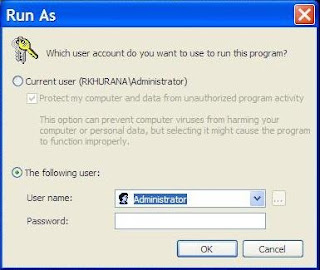
In username type Administrator and in password type the Administrator password if you had set up any, otherwise leave it blank ( in case there is no administrator password set). Press OK.
This will start the setup successfully with administrator rights.
Are you not able to install any applications on your windows computer because of insufficient privileges ? When you try to install some applications it normally prompts a window saying you do not have administrator rights.
What to do in such case and how to install the applications ?
Well there are more than one solutions to this problem. Lets have a look at the Fix below.
Fix:
Right-click on the setup which you want to run for installation and click Run as. A window as shown below will show up.
Run_as_dialogue_box

In username type Administrator and in password type the Administrator password if you had set up any, otherwise leave it blank ( in case there is no administrator password set). Press OK.
This will start the setup successfully with administrator rights.
Subscribe to:
Posts (Atom)
